A phone on a station’s 100 watt USB-C port draws 27 watts and holds there. Move a laptop onto an identical port beside it and the figure climbs to the full hundred. The wattage printed by a USB or Type-C socket marks a ceiling the port can supply. What flows under that ceiling is whatever the device asks for. The gap between the printed number and the delivered one trips up more buyers than any other figure on the panel. Sellers quote the ceiling because it is the biggest true number they can print. Nobody is lying; the reader takes a ceiling for a delivery.
Every modern USB-C port runs a negotiation the instant a cable seats home. Device and port trade messages across the connector’s signalling pins, a conversation done in well under a second. The device lists the power profiles it accepts. From the overlap with its own menu, the port grants the highest one on offer. The 100 on the label is an opening bid, nothing a device is bound to take. Watching a station’s own wattage readout during a charge shows the settled figure, which lands wherever the quieter party set it.
Three parties set the delivered figure, one more than a buyer tends to count. The port caps it from above; the device asks only for what its charger circuit can use; the cable, third and least expected, imposes a ceiling of its own. Delivered power lands at the lowest of the three. Whichever party runs stingiest on the day sets the rate. The cable is the one nobody thinks to check.
The practical habit is to read three things before expecting a fast charge: the port’s number, the device’s appetite, the cable’s rating. On the way out, a station acts as the charger, its battery the energy behind the socket and its PD chip the negotiator. Charging the station through that same port reverses the roles, a mirror case handled separately. Read as an output, the port is the simpler half of the story, the half a buyer touches every day.
Volts times amps, and the two hard edges
Watts are volts times amps. USB output lives entirely inside that one equation. The connector carried 5 volts and half an amp in its first generation, two and a half watts, power for a mouse and no more. Power Delivery kept the equation and lifted both terms: the voltage up a ladder toward 20 and past it, the current from half an amp as high as five. The product climbed from single digits to 240 watts across two decades, the plug itself unchanged. Doubling the voltage does the heavy lifting: raising volts moves more power down the same thin wire than raising amps ever could, without the heat that extra current brings. This is the reason the ladder climbs in voltage first.
One boundary inside that range governs almost everything a buyer meets. Below 3 amps a plain cable copes without complaint. At 3 amps and 20 volts the port reaches 60 watts, the figure a standard USB-C cable tops out at. Past 60 watts the current has to rise toward 5 amps, a level that needs a cable built and marked for it. That single step, 60 watts to anything above it, is where fast-charge disappointment usually begins. Below the step, life is easy and any cable serves. Above it, the cable turns into a chosen component, picked for its rating.
The voltage ladder the port climbs
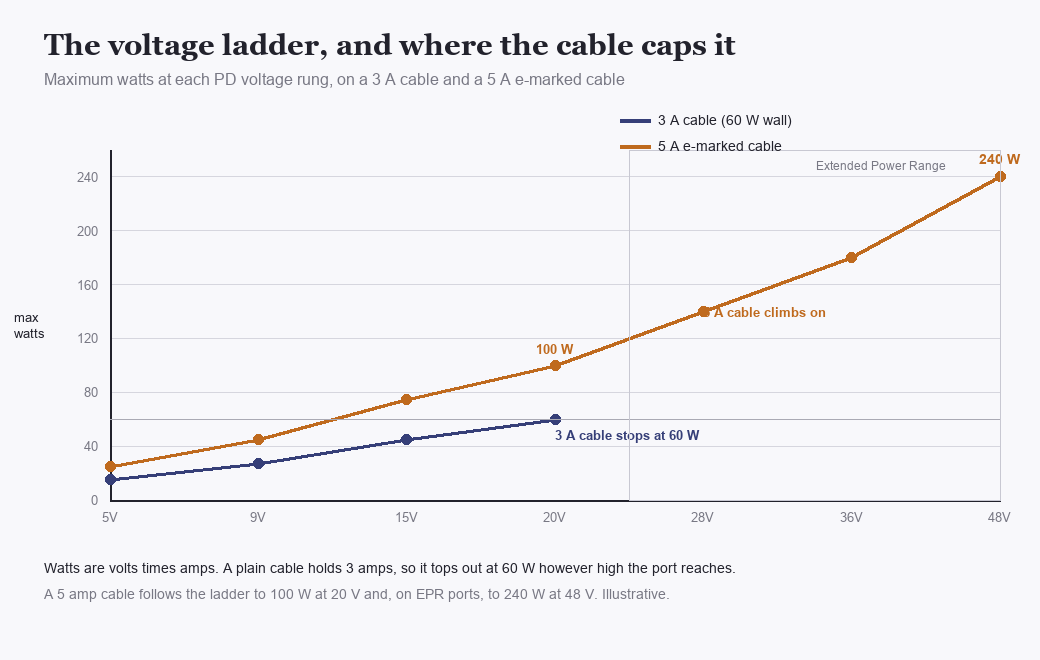
Watts are volts times amps, so the ladder climbs in voltage. A 3 amp cable tops out at 60 watts no matter how high the port reaches; a 5 amp e-marked cable follows the rungs to 100 watts at 20 volts and, on EPR ports, to 240 at 48. Illustrative.
Power Delivery offers power in fixed rungs, a stepped ladder with no smooth dial. The standard profiles sit at 5, 9, 15, and 20 volts, each paired with a current the port can hold. A device asks for a rung; the port grants it when it carries that rung; both hold the voltage steady for the length of the charge. Five volts runs the small stuff. Nine and fifteen suit phones and tablets. Twenty volts carries the laptops. Odd voltages between the rungs do not exist in the fixed set; a device that wants 12 volts takes 9 or 15 and manages the difference inside its own circuit.
Above 20 volts a newer tier opens, the Extended Power Range. Its rungs climb to 28, 36, and 48 volts. At 48 volts and 5 amps sits the 240 watt figure. EPR is what puts a gaming laptop or a small power tool on a USB-C cord. Few small stations reach it yet; the S-class units this concerns tend to stop at 100 watts, the 20 volt rung at 5 amps. The ceiling a port advertises names the highest rung it will ever grant. Reaching that rung asks the device to want it and the cable to carry it, both true at once.
One profile bends the fixed ladder into a slope. Programmable Power Supply, PPS, lets a device and port settle on a voltage in fine steps of twenty millivolts, smoothing the rungs away. The point of it is heat. A phone charging on a fixed 9 volt rung drops that 9 down to its own cell voltage inside its body, a conversion that turns to warmth against the battery. On PPS the port hands over a voltage already near what the cell wants. The phone stays cool. The cooler the cell, the faster it takes a charge and the longer it holds capacity, one reason PPS belongs on the short list of specs to check on a small station. Not every phone speaks PPS. Phones that do gain their biggest advantage on the busiest part of a charge, the first climb to 50 percent.
None of this is set once and forgotten. The pair renegotiates whenever the draw changes, a laptop waking from sleep or a phone crossing 80 percent and easing off. Voltage can step from 20 down to 9 mid-charge as a device’s need falls, the port following in real time. The label figure is the peak the port can hit, touched only when a device both wants and can take the full amount.
Read the port’s number as a maximum voltage-and-current pair, then. A hundred watts means 20 volts and 5 amps available at the top of the ladder. Everything below that the port can also do, one rung at a time, whenever a device calls for less.
PD voltage rungs and the watts a cable can carry at each (illustrative)
Voltage rung
At 3 A (plain cable)
At 5 A (e-marked)
Typical use
5 V
15 W
15 W
phones, small gear
9 V
27 W
45 W
phones, tablets
15 V
45 W
75 W
tablets, light laptops
20 V
60 W
100 W
laptops
28–48 V (EPR)
n/a
140–240 W
gaming laptops, tools
The cable in the middle
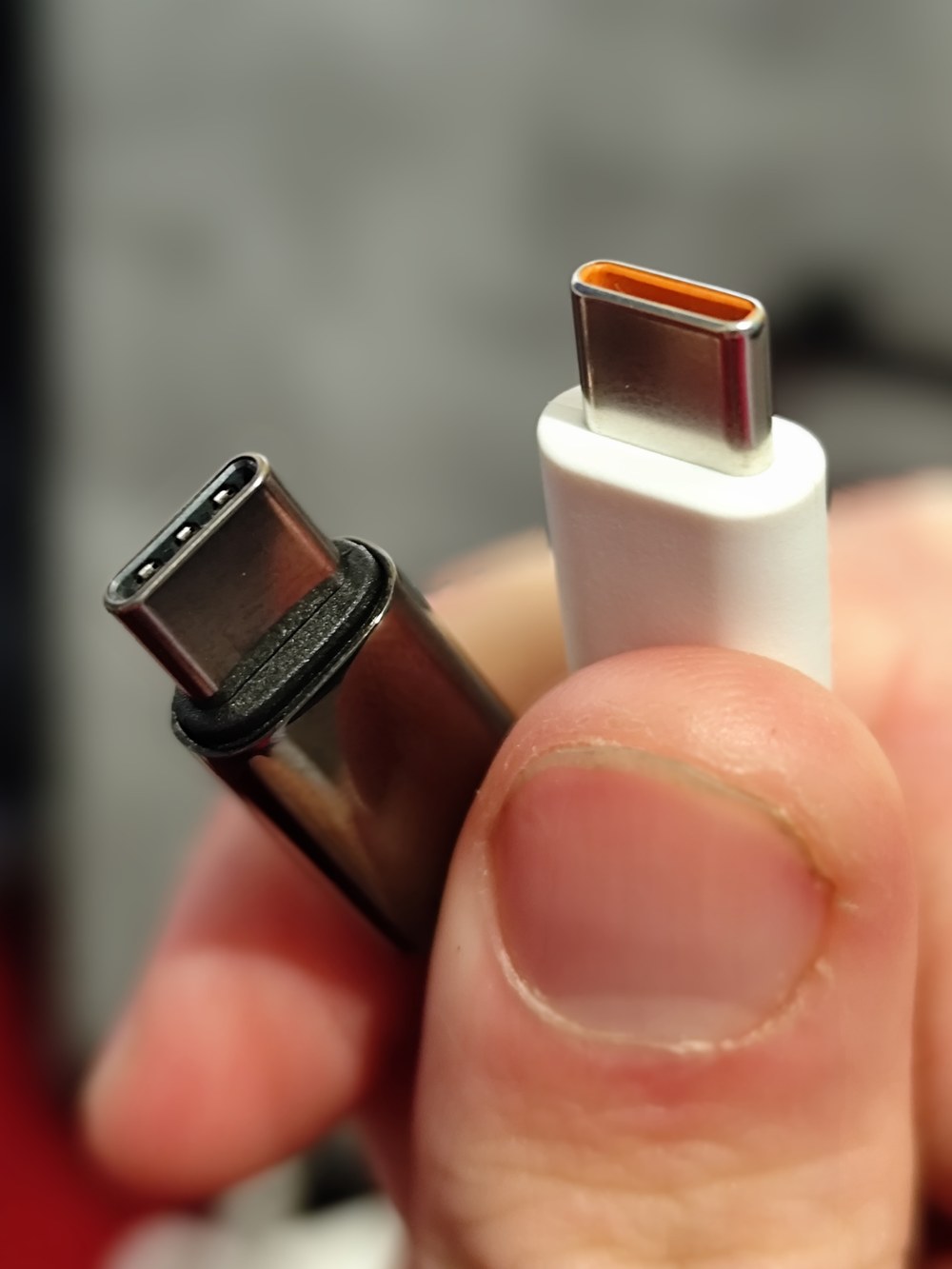
Two USB-C plugs, held together. Nothing outside either one says whether it carries 3 amps or 5; that rating lives in a chip inside the plug, read only during the handshake. The orange inner tongue on the right is a colour choice, not a rating mark. Look-alike cables can differ by 40 watts of ceiling. Photo: Logant547, CC BY 4.0.
The cable earns its own section because it sets the ceiling more often than either box, quietly and without warning. Every USB-C cable carries a current rating of 3 or 5 amps. Above 3 amps that rating has to be declared by a chip inside the plug, an e-marker the port reads during the handshake. A cable without that chip counts as a 3 amp cable, capped at 60 watts whatever the port and device could manage between them.
This is the answer to the complaint that dogs USB-C charging. A 100 watt port, a laptop that accepts 100 watts, a charge that crawls in at 60: the cable is the missing 40 nearly every time. The thin lead that came with a phone, or a generic one from a drawer, carries 3 amps and stops there. Nothing in the port or the laptop announces the shortfall; the number on the screen sits lower than the spec sheet promised and gives no reason. A 5 amp e-marked cable is the one fix that works. No firmware update, no menu setting, and no amount of waiting lifts a 3 amp cable past 60 watts.
Telling a 5 amp cable from a 3 amp one by eye runs close to impossible, which is the trap. The rating lives in the chip, invisible from the jacket. Heavier cables and ones sold for laptop charging tend to carry it. EPR cables for the 140 and 240 watt tiers are marked again separately, rated for the higher voltage as well as the 5 amps. For a station capped at 100 watts, one known-good 5 amp cable kept with the unit settles the matter for every device that will ever plug in. Braided cables sold with a printed wattage on the sleeve are the safe buy; the wattage on the packet is the maker declaring the e-marker inside.
Three limits on one plug
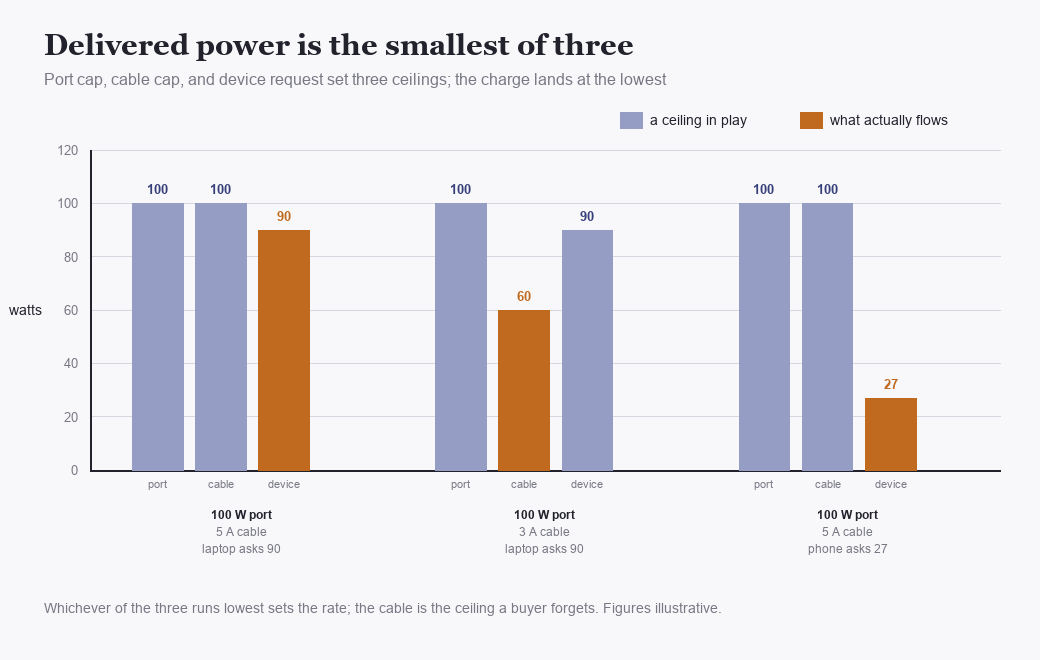
Delivered power lands at the lowest of three ceilings. The same 100 watt port gives 90 to a laptop on a 5 amp cable, 60 to that laptop on a 3 amp cable, and 27 to a phone that asks for no more. Figures are illustrative.
Put the three ceilings together on a single connection. A 100 watt port, a laptop asking for 90, a 5 amp cable able to pass the full 100: the laptop gets its 90, held back by nothing, its own request the lowest number in the room. Swap the cable for a 3 amp one and the same laptop drops to 60, the cable now the floor. Swap the laptop for a phone asking 27 and the figure falls to 27, the port and cable both idling far above it. The delivered watt is always the smallest of the three offers on the table. Knowing which of the three is smallest is the whole diagnostic skill. Two of the three sit in plain sight on labels. The cable’s rating is the hidden one, which is why it wins the guessing game so often.
What real devices ask for
Phones sit at the bottom of the useful range and rarely climb far up it. A current flagship pulls 20 to 45 watts at its fastest, holding that peak only through the first stretch of a charge before the taper. Mid-range phones settle near 18 to 27. A 30 watt port already charges nearly any phone at its own ceiling. A 60 or 100 watt port spends the extra headroom on nothing a phone can use. Fast-charge records on phones come from the phone’s own charger and firmware, not from a bigger port behind them.
Tablets and handheld consoles ask for a little more, 30 to 45 watts for the larger ones. The gap from a phone stays small enough that a 45 watt port covers the whole handheld world at full speed. Portable monitors and the powered accessories that ride USB-C sit in the same band, tens of watts, never near a laptop’s demand. One cable can run a portable monitor and pass its touch data at the same time, the power and the signal sharing the connector.
Laptops are the loads that justify a high cap. A thin ultrabook charges at 30 to 65 watts and runs happily off a 60 watt port. A 14 inch workhorse wants 65 to 96. A gaming or workstation laptop asks 100 to 240 and treats a 100 watt port as slow, drawing what it can and leaning on its own battery while it runs. The cap that matters is the one that meets the heaviest laptop in the house. Buy for that machine and the phones and tablets ride underneath it without a thought.
A device asking more than a port offers does not fail. It takes the ceiling and works within it. A 240 watt laptop on a 100 watt port charges at 100, slowly, drawing on its own battery when the workload runs hot. That undercharge is the cap doing its declared job. The charging light stays on, the percentage climbing slower than a wall brick would manage, sometimes dipping under a heavy render. An undersized cap only ever slows a charge; nothing on either end takes harm from it. Overspeed is the danger the standard was built to prevent. Negotiation is the mechanism that prevents it, a port never forcing more than a device agrees to take.
USB-A, the five-volt relic
The rectangular USB-A ports on a station are a different animal, frozen at 5 volts. No Power Delivery runs on the older connector; it cannot raise its voltage, so its power lives entirely in current. A typical A port gives 5 volts at 2.4 amps, 12 watts. Better ones reach 3 amps, 15 watts. That is the whole envelope, fixed by the connector’s age. USB-A predates Power Delivery. No revision has bolted the newer protocol onto the older shape.
Some A ports break the 5 volt rule through a side channel. Qualcomm’s Quick Charge and a few similar schemes signal a compatible phone to accept 9 or 12 volts on the old connector, reaching 18 watts and past it. The scheme is proprietary, tied to the phone’s chipset, invisible to anything that cannot speak it. A Quick Charge port and a Quick Charge phone run fast together; either one alone falls back to plain 5 volt charging. Reading the A port’s label for a QC or SCP tag tells the buyer whether the trick is present at all.
The split between the two connectors is plain in use. Anything shipped with a USB-C cable belongs on a C port, where the voltage climbs to meet it. Older gear on an A-to-C or A-to-micro cable runs fine on an A port at the slower 5 volt rate. A laptop on an A port draws nothing on the usual machine, the 12 watts on offer sitting below its floor. A device charging slowly on A moves to C as the first thing to try. Half the slow-charge puzzles on a station end there, at the wrong connector.
One budget behind many ports
The wattages printed beside two ports do not always add up to a promise. Many small stations feed all their USB-C ports from one internal supply on one shared budget, so a port marked 100 watts alone drops to 65 the moment a second device joins it. Some labels say so in small type, 100 watts alone or 65 plus 45 with two devices; others leave the buyer to find out. One device on one port sees the full number. Load every port at once and the total divides across them. The split favours whichever device negotiated first on some machines. Others divide it evenly. The manual names the rule for a given unit.
A second, larger budget sits above that one. On many machines the whole output side, AC and USB together, draws from one inverter total, so a heavy AC load can quietly pull the USB ceiling down. How a machine splits its watts across everything running at once is its own topic, handled where allocation is the subject. For the USB ports alone, the rule to carry is that a printed per-port number assumes that port is working by itself. Charging one laptop fast means giving it a port to itself, the neighbouring sockets left empty for the duration.
Reading the label and the slow charge
A USB row on a spec sheet packs four facts into a short line. Take a spec line reading USB-C 100W with PPS, USB-C 30W, USB-A 18W with QC: two C ports at 100 and 30 watts, one of them with programmable voltage, an A port with Quick Charge at 18. The wattages are per-port ceilings, the PPS and QC tags name the tricks each port can do, and any shared-budget note the maker prints sits nearby. Four numbers and two tags settle what the panel can drive. Nothing else in the row changes the outcome for a device with a cord.
Follow one slow charge to its cause, the way an owner meets it in the kitchen. A 96 watt-hour laptop goes onto a station’s 100 watt USB-C port and the screen reads charging. An hour in, the battery shows only 40 percent, a pace near 45 watts where 90 were hoped for. First suspect the cable, the part that fails oftenest here and clears cheapest: the lead in the port is the thin one from a phone box, 3 amps, capped at 60 watts before any other limit is even weighed. A 5 amp e-marked cable goes in to rule it out. The pace lifts partway, the charge now closer to 65 watts than 90. Second suspect the shared budget: a phone is charging on the station’s other C port, on a panel that splits 100 into 65 and 45 with two devices busy. Unplugging the phone frees the full 100. The laptop’s own 90 watt draw now flows clean, the battery climbing at the rate the spec sheet named. Had the pace stayed low with a good cable and an empty second port, the last suspect would have been the laptop itself, holding its own intake down because its cells were warm or its processor was eating power as fast as the port fed it. Each step of that hunt is a number set against a number: delivered watts against the port’s cap, the cable’s rating, the device’s request, the load on the neighbouring port. None of it needs a meter beyond the wattage the station already shows on its own screen. The three suspects come in the order of how often each is guilty, cable first by a wide margin, shared budget second, the device itself a distant third. The rarer cases surface by elimination, one swap at a time, the live readout scoring each attempt as it is made. By the third swap the number has either reached the laptop’s 90 or named the part still holding it back.
Buying comes down to the heaviest device that will lean on the port. A household of phones and tablets is served by 30 watt ports and gains nothing from more. One laptop in the mix lifts the floor to 60 or 100, set by which laptop it is. The rare gaming laptop or the pro-video machine is the one reaching for 140 or 240, tiers still scarce on small stations. Match the top port to the top device, and every lighter load rides comfortably underneath. Headroom above a device costs nothing in use; a 100 watt port charging a phone runs no hotter than a 30 would.
Port count answers a different question than port cap. Four USB ports let four things charge at once. Cap is the separate axis, governing how fast any one of them goes. A weekend of phones is a count problem; add one hungry laptop and it turns into a cap problem. The two rarely compete on a single machine. Ports are cheap to add. High wattage is the feature that runs up the price. A four-port panel of 30 watt sockets and a two-port panel with one 100 watt socket can cost a maker about the same to build.
One more line hides on many USB-C ports: the same socket that powers devices can charge the station from a wall brick or a car adapter. That reverse direction carries its own ceiling, a matter handled elsewhere. As an output, the port asks only to be read for its three numbers and fed a cable that can carry them.
Where the small numbers land
The USB figures on a small station decide more of daily life than the big inverter number does, since phones and laptops are what a person charges every day. The whole behaviour reduces to one line held in the head: delivered power is the smallest of port, device, and cable, so a fast charge needs all three sized alike.
On a real morning the panel does its quiet work, a phone off the 30 watt port at breakfast, a laptop off the 100 through a good cable while the coffee brews, both full before the day starts. The numbers that made that happen were read once, in a shop, off a spec sheet: two ports, two caps, one cable rating to match. Everything after is plugging in. The socket keeps no memory of the choice and asks nothing further of the owner.
Common questions
Why does my laptop charge slowly on a 100W port?
Nine times out of ten the cable. A generic or phone-box USB-C lead carries 3 amps and caps at 60 watts, whatever the port and laptop could do. Fit a 5 amp e-marked cable. If the pace is still low, a second device may be sharing the port’s budget, or the laptop may be drawing more than 100 watts under load.
What is an e-marked cable, and do I need one?
An e-marked cable holds a small chip that tells the port it can carry 5 amps, which is what any charge above 60 watts requires. Below 60 watts a plain cable is fine. Above it, a cable without the chip silently caps the charge. One good 5 amp cable covers everything a 100 watt station will output.
Can a USB-A port charge a laptop?
On the usual station, no. A-ports are stuck at 5 volts and top out near 12 to 15 watts, well below a laptop’s floor. Laptops need the higher voltages only a USB-C port with Power Delivery can supply. Use the C port and a cable rated for the laptop’s wattage.
Does PPS on a port make a difference?
For phones that support it, yes. PPS lets the port match its voltage closely to the phone’s battery, so more of the charging heat lands in the station than in the phone. Cooler charging is faster and gentler on the phone’s cells over years of use. A phone without PPS support charges on the fixed rungs and comes to no harm.
If a port says 100W, do I always get 100 watts?
Only when one device is on that port, with a 5 amp cable, and the device itself asks for the full 100. Many stations split one budget across their USB ports, dropping a 100 watt port to 65 when a second device plugs in. A heavy AC load on the same machine can trim the USB ceiling as well.