Every new design settles its MCU class early: an 8-bit part or a 32-bit one. The two classes have moved close together in price. The choice now turns on what the design asks of the chip: its code, its power budget, its peripherals, the volume it will ship in. This page weighs that decision across cost, power, memory, and the tools a team already runs.
Where the choice stands now
Both classes are alive and in full production. 8-bit cores from the 8051, PIC, AVR, RL78, and STM8 lines still ship each year in numbers counted across the industry in the billions of units. Microchip carries the PIC and the AVR. Renesas carries the RL78. ST carries the STM8. The 8051 core lives on from a dozen makers. 32-bit parts built on Arm Cortex-M cores now reach down to the same low end. ST, NXP, Microchip, GigaDevice, and others build entry Cortex-M0+ parts for that tier. A newer wave of RISC-V parts sells into the bottom of the market alongside them. One of those entry parts sells for a price that once bought only an 8-bit chip. The rule that paired 8-bit with cheap and 32-bit with capable has loosened. A design today picks the class that fits its work.
The decision still matters for the life of the product. The MCU class sets the toolchain a team uses and the debugger it plugs in. It sets the libraries a team can pull in and the parts it can second-source. It decides the programmer on the bench, the IDE on the laptop, and the training a new hire needs. It shapes the board layout, the power tree, and the unit cost at volume. The same choice fixes how the firmware is written and how a future engineer reads it. A class chosen well carries a product through years of production and revisions. A team carries that investment from one project to the next. The table below lays the two side by side across the points that decide it.
An 8-bit and a 32-bit MCU across the points that decide a new design. Ranges are typical, not hard limits. Sources: Arm Cortex-M product data and vendor datasheets.
Point
8-bit
32-bit
Cores
8051, PIC, AVR, RL78, STM8
Arm Cortex-M0/M0+/M3/M4
Clock, typical
8-20 MHz, up to ~64
24-72 MHz entry, higher up the range
Flash / RAM
0.5-128 KB / 0.06-8 KB
16 KB-2 MB / 4-512 KB
Supply
Many run 1.8-5.5 V
Entry parts commonly top near 3.6 V
Math
8×8 multiply, no FPU
Hardware multiply-divide, optional FPU/DSP
Ecosystem
Vendor toolchain, C
Arm CMSIS, RTOSes, wide library base
Unit price floor
A few cents at volume
Within cents of 8-bit at entry
Best fit
Simple, high-volume, instant-on
Compute, connectivity, headroom
What keeps a design on 8-bit
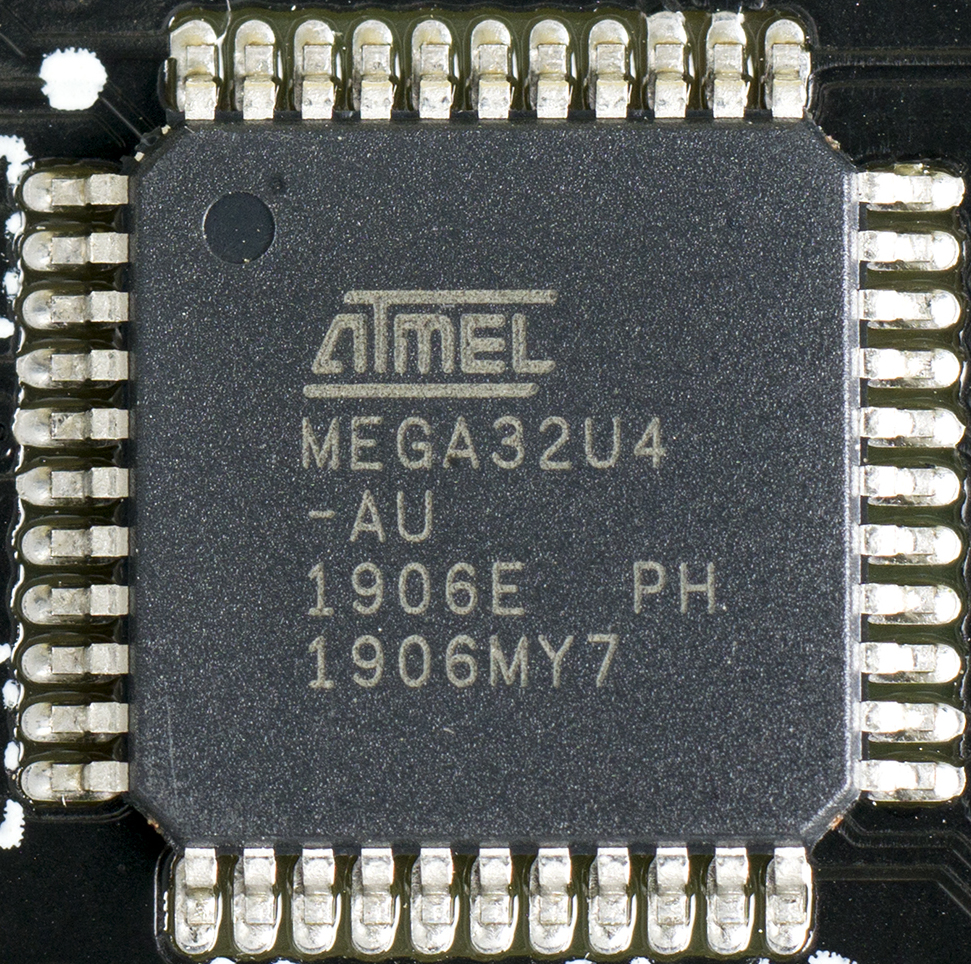
An Atmel ATmega32U4, an 8-bit AVR microcontroller in a 44-pin surface-mount package. The 8-bit class holds the low-cost, high-volume, instant-on end of the market.
The strongest case for 8-bit is the unit cost at the bottom of the market. A simple 8-bit part in a small package costs a few cents in volume. A product that ships in the millions and asks little of its chip lets those cents set the bill of materials. The 8-bit core is small, so the die is small. A small die yields more parts per wafer. It also costs less to test. The package can be a 6-pin SOT-23 or an 8-pin part priced for a throwaway product. A toy, a charger, a smoke alarm, or a power-tool trigger runs on that kind of part. The chip does one job. It costs almost nothing to place on the board. The saving repeats on every unit. At a million units, a one-cent difference is ten thousand dollars on the build, so a design at that scale guards the part price line by line. Contract manufacturers stock the common 8-bit parts in volume, so a buyer rarely waits on an exotic line item. The part, the programmer, and the test fixture are commodity items a factory already runs. A second source for a popular 8-bit part is often a pin-compatible chip from another maker, which keeps the supply chain calm.
Many 8-bit parts run on a 5 V rail. A good number of them span 1.8 V to 5.5 V on the same part. A design with 5 V sensors, 5 V logic, or a noisy industrial supply powers the chip straight from that rail. No level shifter and no separate 3.3 V regulator enter the design. The 8-bit part tolerates the electrical noise a board in an appliance or a motor controller lives with. Its I/O drives a higher voltage and sinks more current for a relay or an LED. The wider supply also rides out the voltage sag and the transients on an unregulated rail. This robustness is built into families that have run in white goods, power tools, and automotive bodies for decades. A board designed around 5 V keeps that rail when it stays 8-bit.
An 8-bit part starts in a few clock cycles. It runs its code from reset with no boot sequence and no operating system to load. A design that has to wake, read a sensor, and act in microseconds gets that timing without a scheduler in the way. Interrupt latency is a fixed, small number of cycles a datasheet states outright. The program is a single loop a developer holds in mind at once. The behavior repeats down to the cycle, which a safety review or a timing-critical control loop values. A motor commutation routine or a switching-supply loop needs that determinism first. A developer who owns every cycle of the part reasons about worst-case timing with the whole program in view. A watchdog timer and a brown-out detector on the same die guard the loop without extra parts. The reset and start-up behavior is documented to the cycle, so a fault in the field traces back to a known state. A short program leaves little surface for a bug to hide in, which an auditor reviewing the firmware values.
8-bit families carry the peripherals a simple product leans on. Many parts include a block of EEPROM for settings that outlive a power cycle. Comparators, a small ADC, a voltage reference, and a timer block sit on the die. A capacitive-touch front end or a PWM unit for a motor comes built in on many parts. A team with a decade of tested 8-bit code carries it straight to the next part in the same family. Reusing that tested code skips the rewrite and the requalification. It ships the next product sooner. A product that passed safety or EMC certification on an 8-bit part keeps much of that evidence when the next model stays on the same family. The test reports and the field history carry forward, a quiet reason a mature line holds its 8-bit part for another generation.
Power in a simple always-on job can stay lowest on an 8-bit part. A chip clocked at a megahertz or two, running a short loop, draws a small current. Sleep modes on modern 8-bit parts pull the standby current down to tens or hundreds of nanoamps. A sensor node that wakes once a second, takes a reading, and sleeps the rest of the time runs for years on a single coin cell. The slower the clock, the lower the active current, so a light task on a slow clock keeps the budget small. A metering or sensor chip that integrates for a fraction of a second each cycle spends the rest asleep, which sets the average current near the sleep figure. The battery sizing then follows the sleep current and the wake duty. The lowest-power 8-bit families, aimed at metering and battery sensors, push the sleep current lower still.
The cost gap today
The price gap that once split the two classes has mostly closed. Entry 32-bit parts built on Cortex-M0 and M0+ cores now sell for well under half a dollar in volume, within cents of a mid-range 8-bit part. Vendors including ST, NXP, and several Chinese makers price their smallest Cortex-M0+ parts against the 8-bit market head-on. A wave of RISC-V parts from makers such as WCH and GigaDevice sells into the same tier and presses the price down further. The Arm core is small. Volume across the whole ecosystem drives its cost down. The 8-bit cost advantage now lives at the lowest tier: the cheapest small-pin parts, the highest-volume runs, the products that count fractions of a cent. Above that floor, a 32-bit part often lands at the price of the 8-bit one a design might have used. For nearly every project, the price has stopped being the line that separates the two. The bottom of the market still belongs to 8-bit on raw price: a sub-ten-cent part in a tiny package holds those sockets. A run of tens of millions turns each fraction of a cent into real money, which keeps the simplest products on the cheapest 8-bit parts. The entry 32-bit price has met the 8-bit price at that level.
What moves a design to 32-bit
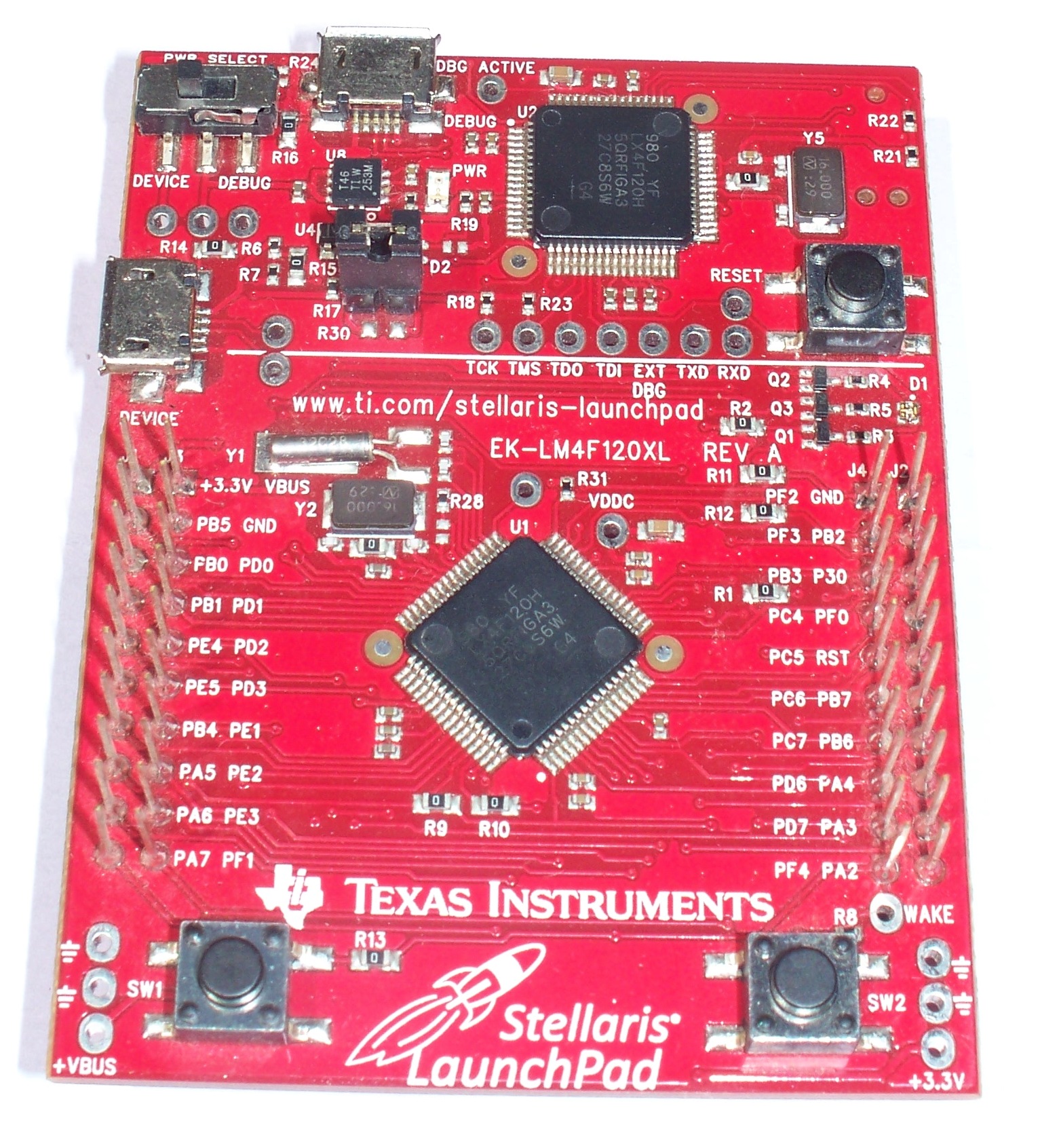
A Texas Instruments LM4F120H, a 32-bit Arm Cortex-M4F, on its Stellaris LaunchPad board. The smaller chip at the top is a second microcontroller that serves as the on-board debugger. A 32-bit core brings the compute, memory, and ecosystem a richer design draws on.
A 32-bit core does more work in each clock. It moves 32 bits in one operation. It multiplies and divides in hardware in a few cycles. A design that filters a signal, drives a color display, or runs a control loop with real arithmetic runs the kind of work a 32-bit core handles in stride. Many Cortex-M parts add a floating-point unit or DSP instructions to handle that load. On the CoreMark benchmark the industry uses to rank cores, a Cortex-M part returns a high score for each megahertz it runs. A part that decodes audio, runs a fast PID loop, or refreshes a TFT panel uses that compute every cycle. A sensor-fusion routine that blends an accelerometer and a gyroscope leans on the floating-point unit. The headroom lets one part run the whole application and still leave cycles spare for the next feature.
32-bit parts carry more memory on the die. Flash runs from tens of kilobytes into the megabytes. RAM runs from a few kilobytes into the hundreds. A large program, a graphics frame buffer, an audio buffer, or a network stack needs that room. A flat 32-bit address space reaches all of it directly. A color display alone can ask for tens of kilobytes of frame buffer. A TCP/IP stack and its buffers claim a large block of RAM. A design that has outgrown the address space an 8-bit part reaches moves up on that need alone. The memory headroom also leaves space for a bootloader and a second firmware image. A safe field update uses that space. A debugger on a 32-bit part sees the whole memory map at once, so a buffer overrun or a stack overflow surfaces in a watch window during a test. The room also lets a developer leave assertion checks and logging in a debug build, with space to spare for the application.
The Arm ecosystem comes with the core. CMSIS, vendor hardware abstraction layers, real-time operating systems such as FreeRTOS and Zephyr, and middleware all target Cortex-M. A connectivity stack for USB, CAN, Bluetooth Low Energy, or TCP/IP exists as a tested library a team drops in. A file system, a graphics library, and a bootloader come from the same pool. A team pulls in tested code that is ready to drop in. A full IDE, whether a vendor Eclipse build or a commercial Keil or IAR toolchain, drives the part over an SWD debug port, with breakpoints, watch windows, and instruction trace. A developer steps through the running firmware and reads the live registers. One toolchain and one core span a whole family, from the entry M0+ to the high-end M7. A skill learned on one Cortex-M part carries to every other. Arm documents the entry core a design starts on at its Cortex-M0+ page.
A 32-bit choice leaves room for the product to grow. A team that picks a Cortex-M family moves to a bigger part in the same family for the next model and keeps its code. Many families offer pin-compatible parts, so a board takes a larger-memory chip in the same footprint. The headroom absorbs features added after launch. A part with spare flash and cycles takes a firmware update in the field. The update can add a protocol or a sensor. A 32-bit part also carries the room for security: a key store, a cryptographic accelerator, and a signed-update path a connected product needs. A product that ships with an update channel builds that channel on the headroom the part provides. A platform built once on a Cortex-M family spreads its cost across a whole product range, from the entry model to the flagship. The next project starts from working drivers, a known toolchain, and a team that already knows the part. The first model and the tenth share one architecture.
The bench a team already owns
The tools a team already runs weigh on the choice. An 8-bit project sits on a low-cost programmer and a light toolchain. A PICkit, an AVR programmer, or a vendor dongle and a free compiler put code on the part. The build is small. It finishes fast. A developer who has shipped 8-bit products reads a register map at a glance and writes to the hardware with no layer in between. The whole flow fits on a modest laptop. It asks for little setup.
A 32-bit part brings the Arm bench with it. An SWD debug probe, a full IDE, and a HAL that hides the registers come with the part. The debugger sets breakpoints, watches variables, and traces execution on the running chip. A team fluent in Cortex-M moves between vendors with the same tools and the same CMSIS calls. The learning curve is paid once and reused on every Arm part after. A team that already lives on one side of this bench saves real time by staying there for the next design.
Making the call
A few questions decide the call. If a product ships in the millions in a 6-pin package, the unit cost holds it on 8-bit. If it runs real math, drives a rich display, or works a control loop, the compute calls for 32-bit. If it carries USB, Bluetooth, or a network link, the stack lives on 32-bit. If it needs a 5 V rail and instant-on timing, 8-bit fits. If it builds on an existing code base, it stays on the architecture that code runs on. A wall thermostat with a screen and a radio lands on 32-bit. These answers line up once a team lists them honestly.
The middle ground is where teams weigh hardest. The job runs on either class. The price is a wash. The decision falls to the team and the road ahead. A team weighs its own fluency against the room to grow. It also counts the cost of the tools it owns and the parts it can already source. The tie usually breaks on where the product is headed. Neither answer is wrong once the price is level.
Supply and longevity sit under the whole choice. A part from a family that has shipped for years signals stock a design can count on. Wide use across many vendors signals second sources and a long catalogue life. A part early in its life on a growing line buys the longest runway. A design checks the lifecycle of the exact part before it commits, on either path. After the class is settled, the design still chooses and qualifies the exact part number it will order.
Common questions about 8-bit and 32-bit MCUs
Is 8-bit dead?
8-bit parts still ship in the billions each year. They hold the bottom of the market on unit cost, on tiny packages, and on 5 V designs that want instant-on timing. A simple, high-volume product runs cheaply and predictably on an 8-bit part. The class is alive and in full production.
Why have 32-bit prices fallen to 8-bit levels?
The Arm Cortex-M0 and M0+ cores are small and licensed widely. Many vendors build entry parts on them and price those parts against the 8-bit market. A newer wave of RISC-V parts presses the same tier. Volume across the whole ecosystem drives the cost down. An entry 32-bit part now sells for well under half a dollar in volume.
Does 8-bit use less power than 32-bit?
It depends on the job. In a simple always-on loop at a low clock, an 8-bit part draws little. In a duty-cycled design, a 32-bit core finishes a burst fast and drops to sleep, which can win on the average current. The power answer follows the workload, the clock, and the sleep current of the exact part.
Can I run an RTOS on an 8-bit part?
Small cooperative schedulers exist for 8-bit parts. A full real-time operating system, with its memory model and its middleware, targets 32-bit Cortex-M cores. A design that needs an RTOS, a network stack, or a file system finds them ready on 32-bit. An 8-bit design usually runs a single main loop.
Which is easier to program?
An 8-bit part runs a small program a developer can hold in mind, with a vendor toolchain and C. A 32-bit part brings the Arm ecosystem: CMSIS, libraries, and a HAL that hides the registers. The toolchain follows the part a design picks.
When should a new design just start on 32-bit?
A design that runs real math, drives a rich interface, carries a connectivity stack, or expects to grow after launch starts on 32-bit. The entry price now matches an 8-bit part. The headroom is there from the first model.