The STM32 name covers hundreds of chips, all built on Arm Cortex-M cores and split into series by the job they target. Selecting the right STM32 means picking the series that fits the design, then the exact part inside it. The choice runs on a few axes: compute, power, memory, peripherals, and cost. A design that reads those axes against its needs lands on a part the whole range backs with one toolchain.
What the STM32 range covers
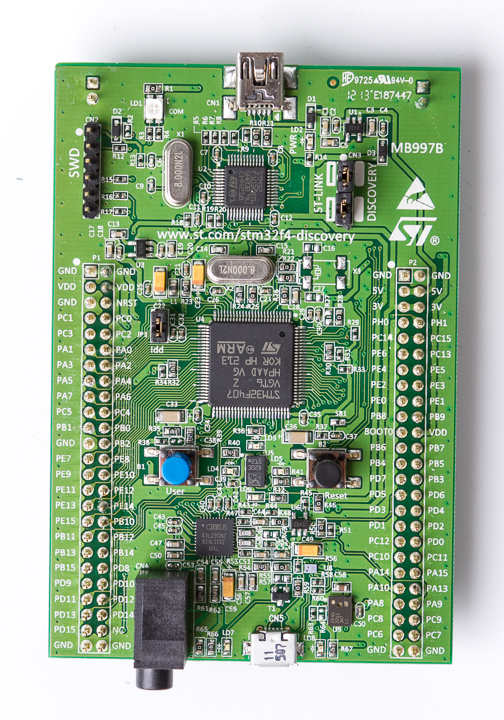
An STM32F4 Discovery board, built around an STM32F407 (a Cortex-M4 part). The Discovery and Nucleo boards put each STM32 series on a board for a design to try before it commits.
The STM32 line runs from a part that costs cents to one that runs a graphics stack at hundreds of megahertz. ST groups the parts into series, each with a letter and a focus. A series shares a Cortex-M core, a power profile, and a peripheral set. The range gives a design one family to grow within, from the smallest job to the largest, on the same tools. ST ships thousands of STM32 part numbers across the series. The clock runs from a few megahertz on a value part to over four hundred on an H7. A design rarely outgrows the range, since a larger job has a larger STM32 waiting on the same software. A team that knows one STM32 reads the next one’s reference manual with little surprise, since the peripherals and the memory map carry across the range.
The letters mark the focus of each series. The C0 and the G0 sit at the value end on a Cortex-M0+. The F4 and the G4 carry a Cortex-M4 with a floating-point unit for mainstream work. The F7 and the H7 run a Cortex-M7 for the heavy compute. The L4 and the U5 chase the lowest power for a battery. The WB and the WL fold in a radio for wireless. Each letter points a design at the part of the range built for its kind of job. The H5, the L5, and the U5 add an Arm Cortex-M33 with security features for newer designs. The WB pairs a Cortex-M4 with a radio core for Bluetooth Low Energy. The WL folds in a sub-gigahertz radio for LoRa. The letter and the digits together place a part on the map of the range. A design reads the letter to find its neighborhood, then the digits to find the exact part.
The series share more than the brand. They build in the STM32Cube software: the CubeMX configurator, the CubeIDE, and the HAL and LL driver libraries. A peripheral learned on one series turns up with the same registers on another. A move from one STM32 to another keeps the toolchain, the drivers, and nearly all of the code. The common ground is the reason a design that starts on an STM32 tends to stay on one. CubeMX sets up the clock tree, the pins, and the peripherals through a graphical view and generates the init code. The HAL gives a portable driver layer across the series, and the LL library gives a thin register-level layer for tight code. A team learns the tools once and carries them across every STM32 project.
The main STM32 series and the Cortex-M core behind each. A guide to the range, not the full list. Sources: ST product data and Arm Cortex-M documentation.
Series
Core
Focus
STM32C0
Cortex-M0+
Lowest cost, entry parts
STM32G0
Cortex-M0+
Mainstream value
STM32F1, F0
Cortex-M3, M0
Legacy mainstream
STM32F4
Cortex-M4
Mainstream with an FPU
STM32G4
Cortex-M4
Mixed-signal and analog
STM32F7, H7
Cortex-M7
High performance
STM32L4, U5
Cortex-M4, M33
Low and ultra-low power
STM32WB, WL
Cortex-M4, M0+
Wireless, BLE and LoRa
Start from the application
The right series falls out of the application, not the catalogue. A design lists what it has to do: the math it runs, the power it can spend, the memory the program needs, the peripherals the circuit talks to, the price the product allows. Those needs name a series before a single part number comes up. A selection that starts from the part number works backward and often lands on the wrong fit. A clear requirements list is the real selection tool. It names the worst-case compute, the supply and the duty cycle, the program size with headroom, the exact peripherals, and the target unit cost. With that list in hand, the range narrows to a series in a few minutes. The list also settles the debate later, since it records what the design needed before anyone fell for a particular part.
The needs sort into a few that matter and a few that do not. A battery sensor puts power first and compute last. A motor controller puts real-time math and timers first. A connected gateway puts memory and a network stack first. The need that dominates the design points at the series, and the rest of the needs check that the series can carry them too. A design ranks its needs before it opens the catalogue. The top need sets the series. The rest become a checklist the candidate parts have to pass. A need missed at this stage shows up late as a respin, so the list repays the care. A short, honest list beats a long wishlist, since it names the needs the design cannot trade away.
The axes that pick a series
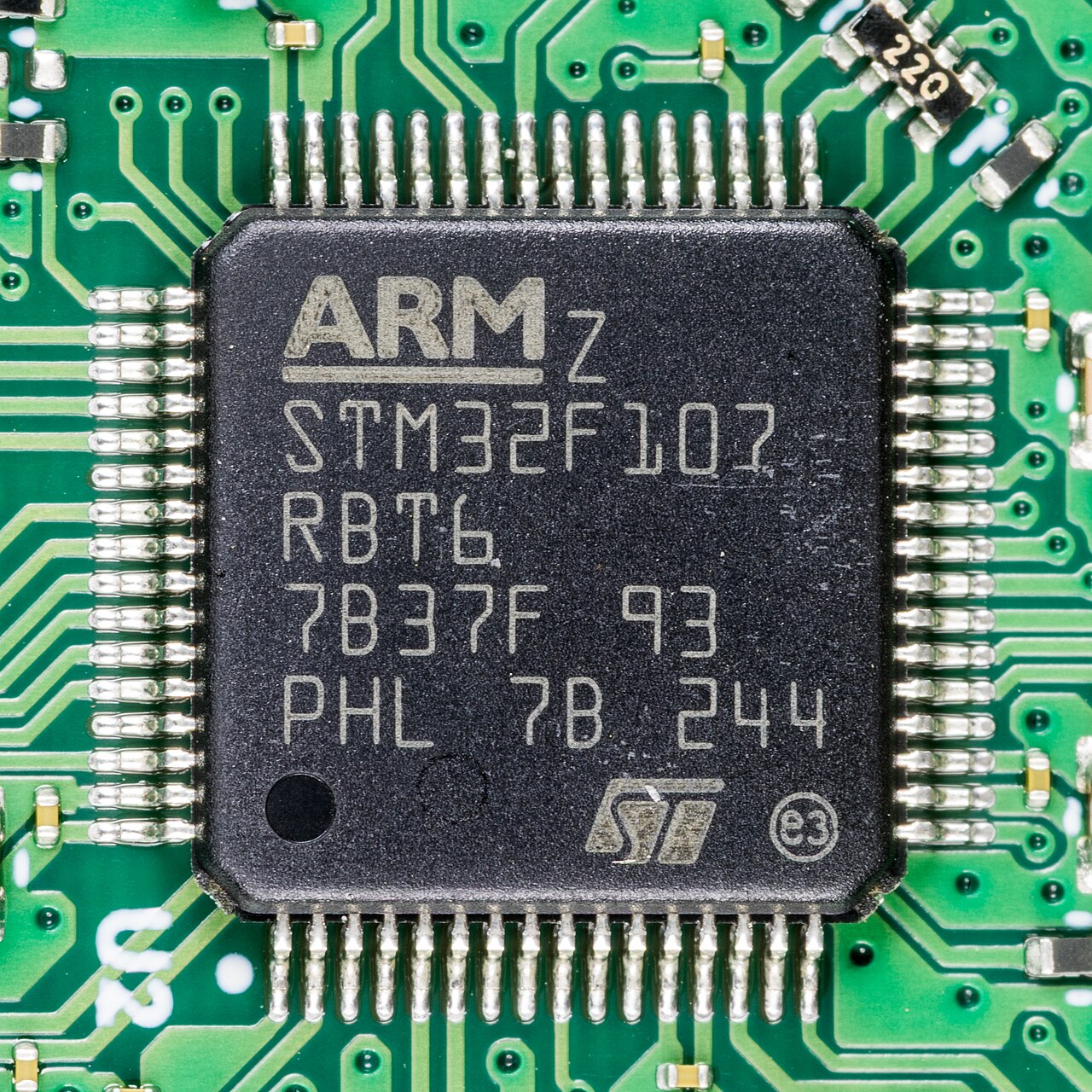
An STMicroelectronics STM32F107, a Cortex-M3 part, on a network board. The marking spells out the family, the pin and flash codes, the package, and the grade that the full part number carries.
Compute is the first axis. The Cortex-M0+ in the C0 and the G0 runs simple control and light logic. The Cortex-M4 in the F4 and the G4 adds a floating-point unit and DSP instructions for filters and control loops. The Cortex-M7 in the F7 and the H7 runs at hundreds of megahertz with caches for the heaviest work. Arm documents the cores the series build on across its Cortex-M pages. A design picks the core that clears its compute with headroom to spare. A Cortex-M0+ handles a state machine, a sensor read, and a simple protocol. A Cortex-M4 with its floating-point unit handles a PID loop, an audio filter, or sensor fusion. A Cortex-M7 with caches handles a graphics stack or a fast control loop. The headroom matters, since a part run flat out leaves nothing for the next feature. A Cortex-M7 brings a longer pipeline and caches that a hard-real-time loop accounts for in its worst-case timing. A design that needs tight, repeatable timing reads the core as closely as the clock speed.
Power is the second axis. The L and the U series hold the lowest current in run, in stop, and in standby, down to nanoamps with the RAM retained. A battery product reads the run current at its clock and the standby current between wakes. A part that wakes briefly and sleeps the rest of the time lives on those two numbers. The ultra-low-power series exists for the design that counts microamp-hours. Run current scales with the clock, so a low clock on a light task saves power directly. Stop and standby modes drop the current to microamps or nanoamps while the RTC and the RAM hold their state. A coin-cell design reads the standby current and the wake duty, then sizes the battery to the years it has to last. A design also counts the cost of the analog and the peripherals left running between wakes, since a single block left on can swamp the core’s sleep current.
Memory is the third axis. Flash runs from a few kilobytes on the C0 to two megabytes on an H7. RAM runs from kilobytes into the hundreds. A graphics buffer, a network stack, or a large application sets the floor the part has to clear. A design sizes its program and its buffers, then picks a part with room above that size for the updates to come. A part that runs out of flash mid-project forces a jump to a larger variant or a different series. The larger STM32 parts add an external memory interface for QSPI flash or SDRAM when the on-chip memory runs short. A design that sizes its memory with margin avoids the late scramble. RAM sets the ceiling for a network stack or a graphics buffer that lives in memory at run time. A part with tight RAM caps the buffers a design can hold, so the RAM figure gets a close read.
Peripherals are the fourth axis. The series carry the same building blocks in different counts: timers, ADCs, DACs, the serial ports, and the connectivity from USB to CAN to Ethernet. The G4 leans into analog with comparators and op-amps on the die. The H7 brings the high-bandwidth interfaces a display or a camera needs. A design counts the peripherals its circuit talks to and reads them off the part’s table. The count of each peripheral matters as much as its presence. A design that needs four UARTs, two SPI buses, and a CAN port reads those counts off the datasheet, not the series name. The connectivity sets the series for a design that talks USB, Ethernet, or a radio. A peripheral the series lacks forces a move to a series that carries it, so the count is read before the part is set.
Cost and package are the fifth axis. The C0 and the G0 reach the lowest unit price for a value design. The package runs from a small QFN to a large BGA, with the pin count tied to the I/O the design uses. A high-volume product weighs the unit price against the features it draws on. The cheapest part that clears every other axis is the one the design wants. Pin count drives the package, from a 32-pin QFN on a small board up to a 144-pin part that needs more room and a finer process. A design picks the smallest package that brings out the I/O it uses. The package is fixed before the board layout starts.
The part number, decoded
An STM32 part number packs the choice into a string. It opens with STM32, then the family letter and the sub-family digits, such as F407. A letter for the pin count follows, then a code for the flash size, then the package and the temperature grade, as in STM32F407VGT6. The V marks the pin count, the G marks the flash, the T marks the LQFP package, and the 6 marks the temperature range. Reading the string tells a buyer the exact variant, and the ST selector builds the string from the choices a design makes. The temperature grade in the last digit picks the range the part is rated for, from commercial to industrial. The same family runs in several packages, so the package code names the body the board is laid out for. A buyer that reads the whole string orders the exact variant the design qualified. A change of one letter in the string changes the part, so the build records the full ordering code. The distributor stocks parts by that code, down to the package and the grade. A datasheet table maps every letter and code to its meaning, so a buyer decodes any STM32 number from it.
From a series to the exact part
A series narrows to a part by pins and memory. Inside a series, the parts share the core and the peripheral set and differ by pin count, flash size, and package. A design picks the smallest variant that holds its program and brings out its I/O. The pin-compatible variants in a series let a board move up a memory size or a pin count without a redesign. A board laid out for one variant takes a larger-flash part in the same family on the same footprint. A design that expects to grow leaves headroom in the pin map and the memory for the larger variant. The pin-compatible step is the cheap way to add room after the board is set. A design that picks the middle variant of a series leaves a step up and a step down on the same footprint.
The selection tool turns the axes into a shortlist. The CubeMX selector filters the whole range by core, power, memory, peripheral, and package, and it lands on the parts that meet every filter. A design sets its needs as filters and reads back the handful of parts that pass. The shortlist then goes to the checks that decide which one ships, covered next. The CubeMX selector reads the whole range and applies each filter in turn, down to the parts that pass them all. A design saves the filter set with the project, so a later revisit starts from the same shortlist. The tool turns a catalogue of thousands into a list a team reads in a sitting. A design works down that shortlist by hand, weighing the few parts that passed on price, on stock, and on the ecosystem behind each. The selector narrows the field to a shortlist the engineer then decides from.
Choosing for the long run
A part chosen for a product carries more weight than a part chosen for a demo. A second source guards the design: a pin-compatible STM32 in stock, or a part from another maker that fits the footprint, keeps the line running through a shortage. A design weighs those in-stock alternatives as part of the selection. It notes them early, while the schematic still has room to fit them. The domestic Cortex-M parts that drop into an STM32 footprint widen that list of alternatives.
Stock and lifecycle sit under the choice. A design checks that the exact part is in production, stocked, and clear of an end-of-life notice before it commits. ST publishes the lifecycle of each part, and a buyer confirms it for the package and the grade the design needs. A part early in its life, on a series ST still grows, buys the longest runway. A part flagged not recommended for new designs goes off the list, since it carries an end date. The lifecycle page and a subscription to the change notices keep a design ahead of a part’s retirement. A long-lived product plans the part the way it plans the rest of the bill of materials.
The ecosystem carries the design after the part is picked. The CubeIDE, the HAL, the example projects, and the community around the STM32 shorten the firmware work. A part inside that ecosystem reaches a working state faster than a part a team meets for the first time. The choice of a series is a choice of the tools and the support behind it. The CubeIDE bundles the editor, the compiler, and the debugger in one free tool. The choice of toolchain, Keil against the CubeIDE, is a separate question a team settles by its habits. The examples and the application notes for the chosen series cut the time from a blank project to a running one. A large user base means an answer to a common problem is already written down somewhere. The application notes and the forums turn a hard bring-up into a search.
The series is the first decision, and the part number is the one a buyer orders. A design that reads its needs onto the axes, narrows to a series, and qualifies the exact part ships on a part it can trust. The STM32 range rewards a selection made with the application in hand. The right series is the one the design grows into, not out of. A selection done this way holds for the life of the product, since the part was chosen against the needs, the supply, and the tools together.
Common questions about selecting an STM32 series
How do I choose an STM32 series?
Start from the application. List the compute, the power budget, the memory, the peripherals, and the cost the design needs. Those needs point at a series: a Cortex-M0+ value part, a Cortex-M4 mainstream part, a Cortex-M7 performance part, or a low-power L or U part. The series then narrows to a part by pins, flash, and package.
What is the difference between the STM32 series letters?
The letter marks the focus. The C0 and G0 sit at the value end on a Cortex-M0+. The F4 and G4 carry a Cortex-M4 with a floating-point unit. The F7 and H7 run a Cortex-M7 for heavy compute. The L4 and U5 chase the lowest power. The WB and WL add a radio for wireless work.
Which STM32 is the lowest cost?
The STM32C0 sits at the bottom of the range on price, with the G0 a step up in features at a value price. Both run a Cortex-M0+. A high-volume value design starts at the C0 and moves up only for a feature it needs. The unit price drops with volume and varies with the package and the memory size.
Does moving between STM32 series mean rewriting the firmware?
The STM32 series share the STM32Cube software, the HAL and LL drivers, and nearly all the peripheral registers. A move within the range keeps the toolchain and nearly all of the code, with changes where the peripheral count or the clock tree differs. A move to a different core, such as M4 to M7, keeps the C code and rebuilds for the new core. The shared ecosystem is the reason a design tends to stay on STM32.
How do I read an STM32 part number?
An STM32 part number runs STM32, the family and sub-family such as F407, a letter for the pin count, a code for the flash size, the package, and the temperature grade. In STM32F407VGT6, the V is the pin count, the G is the flash size, the T is the LQFP package, and the 6 is the temperature range. The ST selector builds the string from the choices a design makes.
What guards an STM32 design against a shortage?
A second source guards the line. A pin-compatible STM32 variant, or a part from another maker that drops into the same footprint, keeps production running if the first part runs short. A design notes the alternatives early and lays the board out to fit them. Stock and lifecycle checks before the commit keep a surprise off the line.